 Adria
Convert a PDF to Markdown and keep the images
Most PDF-to-Markdown tools only pull out the text, so photos, charts and diagrams quietly disappear. ToMarkdown's AI conversion keeps them. Each figure is saved as its own image file, and the Markdown links to it in the right place. You download a ZIP with the .md file and an images/ folder, unzip it, and the pictures show up in Obsidian, Typora, VS Code or anything else that reads Markdown.
Why images usually go missing
Text extractors read the PDF's text layer. Images aren't text, so they're skipped. Microsoft MarkItDown, the open-source tool behind our free mode, works this way too. Free conversion is great for plain text PDFs, but it never keeps images. To keep figures you need a tool that finds each one on the page, saves it and writes a link in the Markdown. That's what AI conversion does.
What gets kept as an image, and what becomes text
ToMarkdown decides this page by page. You don't pick an image mode.
| On the page | In the Markdown |
|---|---|
| Photos and illustrations | Kept as image files. In digital PDFs the original embedded image is used |
| Charts, diagrams, figures | Kept as images. Vector charts are captured as a picture of that area |
| Logos | Kept as images, usually with the name as alt text |
| Screenshots showing an interface, a chat or account details | Kept as images, because the picture itself is the evidence |
| Ordinary text and tables | Written as Markdown text and tables. No screenshot of the same area is kept |
| Text inside a kept image | Not typed out a second time |
| Watermarks, decorative backgrounds | Left out |
Two things follow from this. Text that lives inside a chart stays inside the image, so it isn't searchable in the Markdown. And on a scanned page, figures are cropped from the scan, so they're only as sharp as the scan.
Real examples
These come from our public conversion examples, with output exactly as produced.
A magazine contents page. On page 2 of a Barron's issue, the photo of an analyst and the small cover image were kept as their original images. The three-column text around them was written as Markdown in reading order, and the red diagonal watermark was left out.

A slide with dozens of logos. Page 2 of a company deck is a partner logo wall. Each logo was saved as its own file with the company name as alt text, and the logos were grouped by partner type. So  sits under the battery-partner heading. One thing to check: in another run, one customer group landed under upstream suppliers.
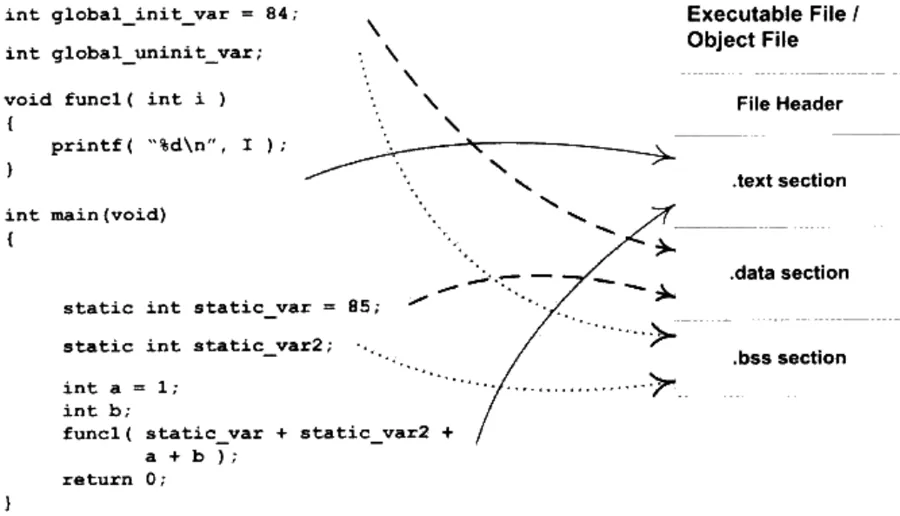
A figure in a scanned book. Page 4 of a scanned programming book has a diagram made of code and arrows. It was cropped tightly with all four edges intact, the caption "图 3-1" stayed as text below it, and the running header, page number and site watermark were left out.
What's in the ZIP
final.md
images/
  p002_f1.png
  p002_f2.png
p004_f1.pngfinal.mdis the whole document, pages in their original order. If the job isn't finished yet, the file isdraft.mdwith whatever has been saved.images/holds only the images the Markdown actually uses. Names follow the page and figure number, sop004_f1is the first figure on page 4.- Links are relative, like
, so they keep working as long asimages/stays next to the.mdfile.
How to convert, step by step
- Open the ToMarkdown workbench and choose AI conversion. It needs a signed-in account with a verified email and a balance. Top-ups start at US$5, one-time.
- Upload your PDF (up to 20 MiB and 200 pages) and check the estimated cost. Nothing is charged until you confirm.
- Review the pages. The reading preview shows the images in place, and you can compare with the original page. If a figure is cut off or missing, redo just that page.
- Download the ZIP and unzip it somewhere you keep notes.
Across our six measured documents, AI conversion averaged about US$0.005 per page (US$0.002–0.009 by document). Budget US$0.01 per ordinary page. That isn't a cap, and the pricing page has the details.
Using it in Obsidian, Typora and other apps
Obsidian. Obsidian can open and display PDFs, but it doesn't turn them into Markdown notes by itself. Community plugins exist for that. With ToMarkdown, unzip the download into a folder inside your vault. The note and its images/ folder go together, and the standard image links display without extra setup. Rename final.md to something useful. If you move the note later, move the images/ folder with it, or the links break.
Typora and VS Code. Open final.md from the unzipped folder. Both show relative images in their preview.
GitHub and static site generators. Commit the .md file and the images/ folder together and the relative links resolve.
Notion and other import tools. Importers handle local images differently, and some only take the text. Try a small file first and check that the images came across.
Image posts. Adria Studio takes the Markdown or the whole ZIP, images included, and lays it out as image posts.
When ToMarkdown isn't the right tool
- You need every image at full print quality. Vector charts and figures on scanned pages are captured as pictures of that area, which is fine on screen but not for print or design work. Use a PDF image extractor, or export from the original source file.
- You want one self-contained file. ToMarkdown links to separate image files. It doesn't embed them as base64 inside the
.md. - You want text out of charts. Labels inside kept images aren't transcribed. Ask for the chart's data from the source if you need it.
- Your PDF is text-only. If it has no figures worth keeping, free conversion may be all you need. It's free for selectable-text PDFs up to 10 MiB and 100 pages, and the files are deleted 24 hours after upload.
Questions
Does free conversion keep images?
No. Free mode only extracts selectable text, and the download is a single .md file. Images need AI conversion.
Why are some images missing or cropped oddly?
The page layout decides what counts as a figure, and complex pages vary. Redo that page and it gets more care. Small decorative pieces are sometimes left out on purpose.
Are the image links absolute or relative?
Relative, like images/p004_f1.png. Keep the folder structure from the ZIP and they work in any Markdown app.
How long are my files kept?
AI documents stay in your account until you delete them (each account has 1 GiB of storage). Free documents are deleted 24 hours after upload.
What about tables next to the images?
Tables become Markdown tables, not screenshots. See PDF tables to Markdown for how merged cells and two-row headers are handled.