 Adria
Convert PDF tables to Markdown tables
A table in a PDF can be turned into a clean Markdown table, but Markdown tables are simpler than PDF tables. There are no merged cells, only one header row, and no line breaks inside a cell. So any converter has to flatten some things. This guide shows what gets flattened, using real pages we converted with ToMarkdown, and how to check the result before you rely on it.
What a Markdown table can and can't hold
A Markdown table (the GitHub-style "pipe table" most apps support) is a grid of plain text:
| Time | Agenda |
| --- | --- |
| 09:00-09:05 | Welcome and introductions |
That grid has a few hard limits:
- Exactly one header row. A second header row has to be merged into the first.
- No merged cells. A cell that spans three rows in the PDF has to be written once, or repeated, or turned into a line above the table.
- One line per cell. Line breaks inside a cell get joined. Some renderers accept
<br>, but not all. - No cell styling. Colors, shading and borders are gone. Bold and italic text still work.
- The pipe
|is special. A literal pipe inside a cell needs escaping as\|.
None of this is a ToMarkdown quirk. It's what the format allows. If you need merged cells exactly as printed, an HTML table or a spreadsheet keeps them; Markdown doesn't.
How each kind of table usually turns out
| In the PDF | What you get in Markdown | What to do |
|---|---|---|
| Simple grid with ruled lines | A matching Markdown table | Spot-check a few rows |
| Table with no vertical lines | Columns rebuilt from text alignment | Check the column count on every row |
| Two header rows | One header row with combined names, like "Fixed annual pay 25th percentile" | Confirm each column name matches its numbers |
| Merged cell spanning rows | Value written in the first row, the rest blank | Fill it down if each row must stand alone |
| Merged title row across the top | Plain lines above the table | Nothing, unless you want it as a heading |
| Line breaks inside a cell | Joined into one line | Reread long cells |
| Scanned table (an image of a page) | Table transcribed from the image | Check every number |
| Very wide table (10+ columns) | A valid table that is hard to read as text | Consider a spreadsheet instead |
Three real examples
These come from our six public conversion examples. The Markdown is exactly what the AI conversion produced, not edited by hand.
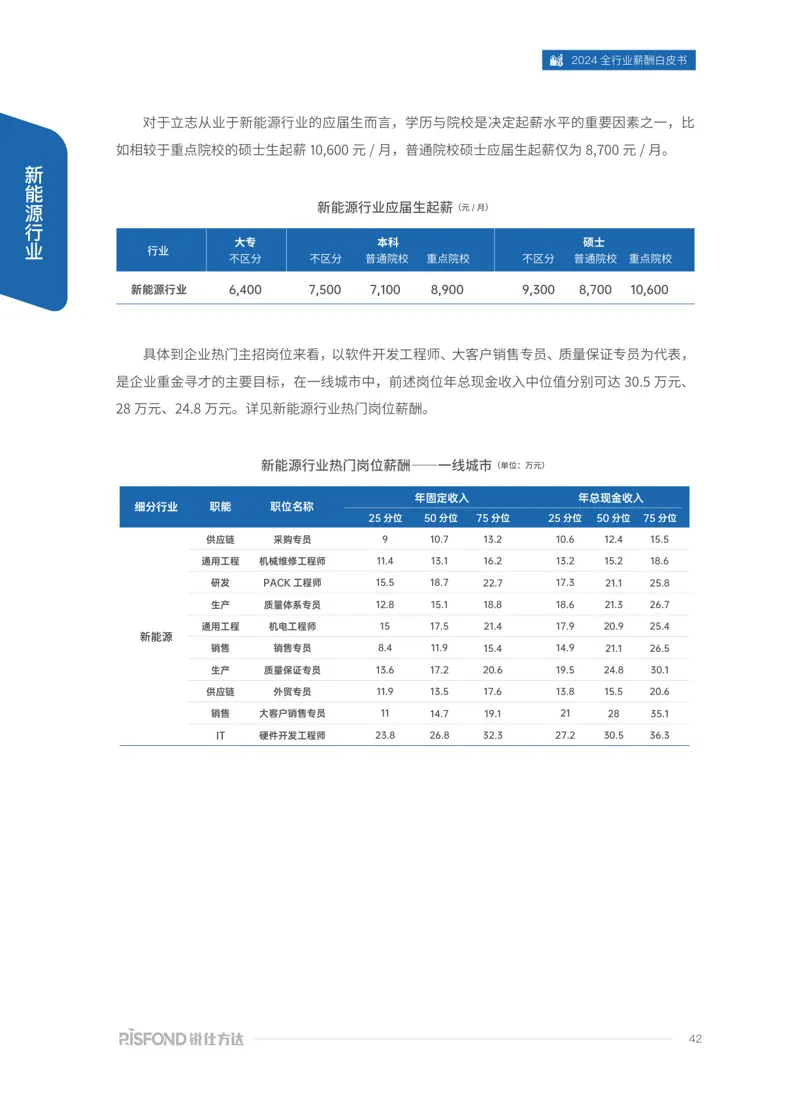
A salary table with two header rows. Page 13 of a Chinese salary white paper has degree × school headers on one table, and fixed pay / total cash × 25th, 50th, 75th percentile on another. ToMarkdown flattened the two header rows into column names like "年固定收入 25分位" (fixed annual pay, 25th percentile). Every number came straight from the PDF's own text, so there is no retyping. The merged "新能源" (new energy) segment cell was written only in the first row, and the rows below it are blank:
| 细分行业 | 职能 | 职位名称 | 年固定收入 25分位 | ... |
|---|---|---|---|---|
| 新能源 | 供应链 | 采购专员 | 9 | ... |
| | 通用工程 | 机械维修工程师 | 11.4 | ... |
That reads fine to a person. If you're going to split the file into chunks for search or an AI knowledge base, each row loses its segment once it's separated from the first. In that case, fill the value down by hand (or with find-and-replace) before you use it. Of the six example pages, this one cost the most: about US$0.018, in 47 seconds.
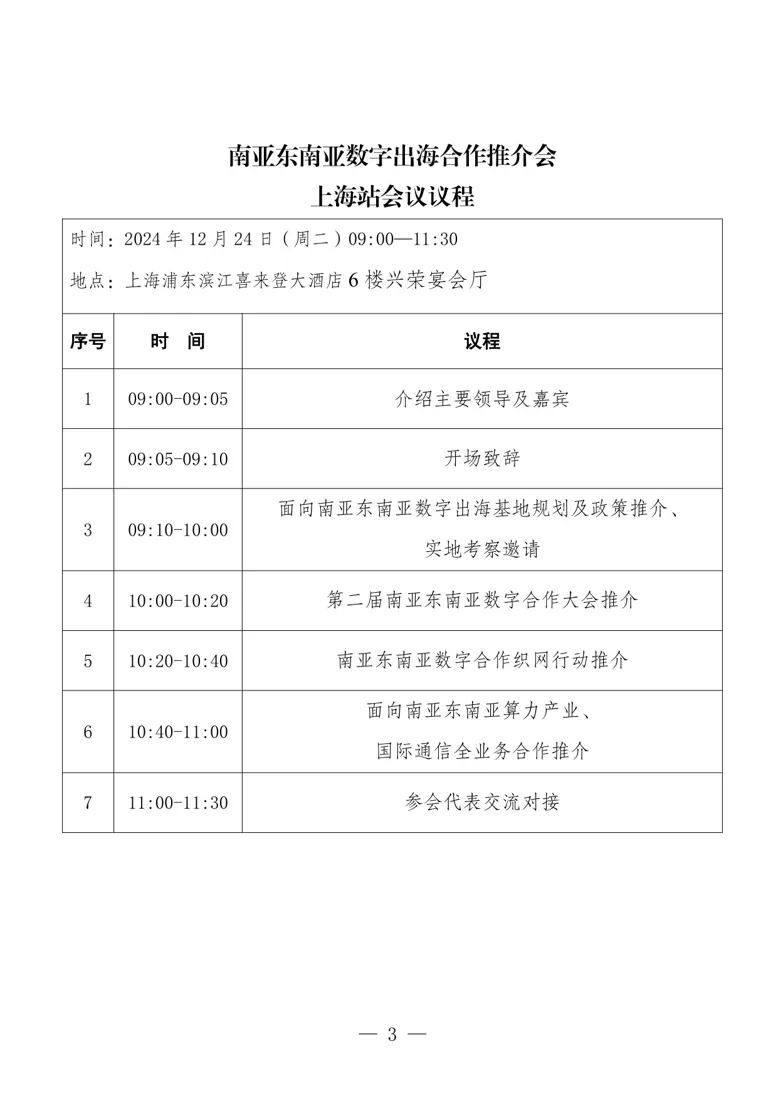
An agenda table exported from Word. Page 3 of an event invitation has a merged first row holding the time and venue, and cells with line breaks. The merged row became two plain lines above the table ("时间:…" and "地点:…"), the line breaks inside cells were joined, and the seven agenda rows became a three-column table. One honest miss: the two-line event title wasn't marked as a heading.
A small index with no vertical lines. On a Barron's contents page, a little index in the corner has no column rules, just aligned text. It came out as a four-column table with two name and page pairs per row, the same layout as print. Because Markdown needs a header row, the first data row ("Index | P.4 | Winners & Losers | P.29") sits in the header position. That's a normal side effect of the format, and it's worth knowing about if a script reads the header.
How to convert a PDF table with ToMarkdown
- Open the ToMarkdown workbench and choose AI conversion. Tables are part of what AI mode handles; free mode only extracts text. AI needs a signed-in account with a verified email and a balance (top-ups start at US$5, one-time).
- Upload the PDF (up to 20 MiB and 200 pages). You'll see an estimated cost before anything starts. Pages with tables count as complex and get extra care automatically. There's nothing to pick.
- Compare each table page with the original. The workbench shows the original page next to the reading preview and the Markdown source.
- Redo a page if a table came out wrong. Redo runs that one page again with more care. It's billed by actual usage and may cost a little more than the first pass.
- Download the Markdown, or a ZIP if the document also has images.
For budgeting: across our six measured documents, AI conversion averaged about US$0.005 per page, and US$0.002–0.009 per page by document. The most expensive single page was near US$0.021. US$0.01 per ordinary page is a safe planning number, but it's not a cap. See pricing for how billing works.
How to check a converted table
Tables are where small mistakes hide, so give each one a minute:
- Count the columns. Every row should have the same number of cells as the header. A row with one cell too many usually means a value slid sideways.
- Check units and captions. Units often live in the caption ("单位:万元", in ten-thousand yuan) above the table, not in the cells. Make sure the caption came along.
- Spot-check numbers. Pick the first row, the last row and one in the middle, and compare them with the PDF. If the table has totals, add up a column.
- Look at blank cells. A blank can mean "same as above" (a merged cell) or "really empty". The PDF tells you which.
- On scanned pages, check everything. On a digital PDF the numbers come from the PDF's own text. On a scan they are read from the image, and a blurry 3 can become an 8.
When ToMarkdown isn't the right tool
- You want to calculate. If the table is going into formulas or charts, export to Excel or CSV instead. Desktop PDF editors can export tables to spreadsheets. For developers, Tabula and Camelot pull tables from text-based PDFs into CSV, and pandas can turn a DataFrame into a Markdown table with
df.to_markdown()(it needs thetabulatepackage). - The table is extremely wide. Twelve or fifteen columns are valid Markdown but hard to read as text. A spreadsheet may serve you better.
- You need merged cells exactly as printed. Markdown can't hold them. Use HTML or keep the PDF.
- You only have simple text tables and want it free. Free conversion uses Microsoft MarkItDown on our server. On form-like pages it sometimes produces a simple table, but it doesn't promise one, and complex layouts may lose detail. It's still worth a try, and it's free for selectable-text PDFs up to 10 MiB and 100 pages. Free documents are deleted 24 hours after upload.
Questions
Can a Markdown table have merged cells?
No. Standard Markdown tables have no row span or column span. A converter has to write the merged value once, repeat it, or move it above the table. ToMarkdown writes it once in the first row, as in the white paper example.
Will free conversion keep my tables?
Sometimes, for simple aligned tables, but there's no guarantee. Free mode extracts text without AI, so complex tables, multi-row headers and scanned tables usually need AI conversion. Not sure whether your PDF is a scan? See how to tell if a PDF is scanned.
Can ToMarkdown give me Excel or CSV?
No, the output is Markdown only. To move a Markdown table into a spreadsheet, paste it as text and split the columns on the | character, or use one of the table extractors above.
Does it work on scanned tables?
Yes, in AI mode. The table is transcribed from the page image, so check every number against the original. For more on scans, see scanned PDF to Markdown.
What if my document has tables and images?
AI mode handles both on the same page: tables become Markdown tables, and photos, charts and diagrams are kept as image files. Here's how images come out.