 Adria
How to convert a scanned PDF to Markdown
A scanned PDF is a stack of page photos, so a normal PDF to Markdown converter has no text to pull out. You need a converter that reads the page image, either an OCR step before conversion or a tool that does recognition itself. Below is how ToMarkdown's AI conversion handles scans, two real pages it converted, and the other routes worth knowing about.
Why your converter returned an empty file
Most free converters, including ToMarkdown's free mode (the open source Microsoft MarkItDown tool), read the PDF's text layer. A scan doesn't have one, so you get blank pages or a few stray characters. In ToMarkdown's free mode, those pages show "no extractable text".
Some scans come with a hidden OCR layer added by the scanner. Then a text extractor does get words, but often with broken lines, odd spacing and no headings. Not sure what you have? How to tell if a PDF is scanned takes about a minute.
What AI conversion does with a scanned page
You don't pick a mode. When you upload, ToMarkdown checks every page. Pages without a usable text layer, including scans with a hidden OCR layer, are treated as scans:
- A layout model finds the illustrations on the page and crops tight to their edges.
- The body text is recognized word for word from the page image.
- Running headers, page numbers and book watermarks are left out.
- Headings, lists and tables are written as Markdown, and the cropped figures are linked from the text.
Two real examples from our conversion examples:
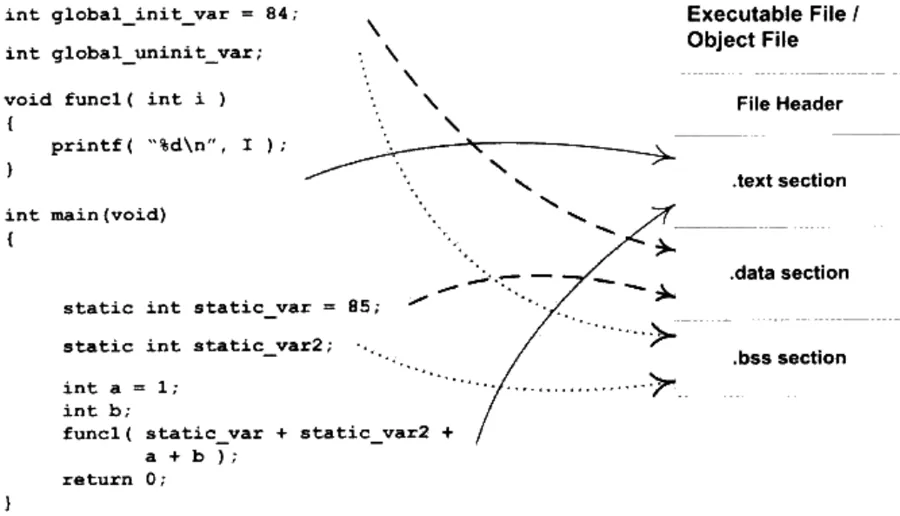
A scanned programming book on linkers and loaders, page 4. The page had a running header, a page number, the book title and a website watermark, plus a figure made of code and arrows. The header, footer and watermark were left out, the Chinese body text was transcribed, a section heading came out as # 3.2 目标文件是什么样的, and the figure was cropped with all four edges intact and linked as . That page took 3 seconds and cost about US$0.002.
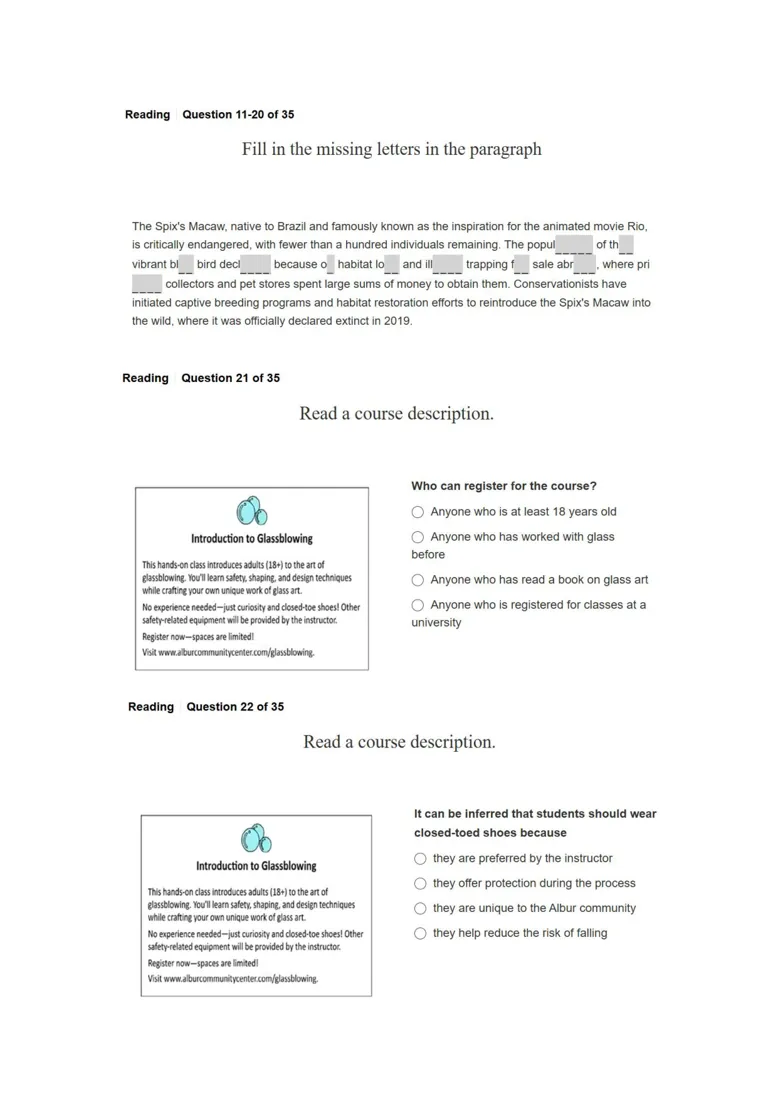
A scanned TOEFL practice test, page 2. The underscores in a fill-in-the-blanks paragraph show how many letters are missing, so their count matters. All 10 blanks on this page came out with the right number of spaces, for example The popul\_\_\_\_\_ of th\_\_ vibrant bl\_\_ bird…. The small icons on the course cards were cropped as images. 8 seconds, about US$0.004. One honest caveat: in another run, the whole course card was kept as an image instead of text.
Step by step
- Open the ToMarkdown workspace, sign in and choose AI conversion. Scans need AI; free mode can't read them.
- Upload the PDF (up to 20 MiB and 200 pages). For a larger scan, split it into parts first.
- Check the estimated cost on the draft screen, then start. Our measured documents cost US$0.002 to US$0.009 per page. Pricing explains how billing works.
- Go through the pages with the original next to the Markdown. Look hard at names, numbers, dates and blanks.
- Redo any page that looks wrong. A redo takes more care and may cost a bit more.
- Download the Markdown, or the ZIP with
final.mdand animages/folder for the cropped figures.
Getting better results from a scan
- Resolution. Text you can read comfortably when zoomed in on screen is a good sign. Blurry, faxed or photocopied-many-times pages are where misreadings happen.
- Straight, clean pages. Crooked pages, shadows at the spine and fingers in the frame all make recognition harder. If you're scanning yourself, flatten the book and keep pages square.
- Check the things AI can't guess. Recognition can confuse similar characters, so check account numbers, amounts, chemical names and blanks against the original.
- Watermarks. They're left out, but text that a watermark fully covers can't be recovered.
- Long boilerplate. Very long standard text on scanned pages, such as a widely reprinted legal disclaimer, can occasionally stop partway through. Native text pages aren't affected.
Your options for scanned PDFs
| Route | What you do | Good for | Watch out for |
|---|---|---|---|
| OCR first, then convert | Run OCRmyPDF (Tesseract) to make a searchable PDF, then a text converter such as MarkItDown | Free, local, batches | Headings, tables and figures usually need manual work; line breaks can be messy |
| Local layout tools with OCR | Install Marker, Docling or MinerU and run them on your machine | Many files, data that must stay local | Setup time; a GPU helps a lot; read each project's licence, as some put conditions on model weights or commercial use |
| Online AI converter | Upload to a service such as ToMarkdown | A few documents, no setup, figures cropped for you | Pay per page; files are uploaded; check the result page by page |
None of these is perfect on a hard scan, and we haven't benchmarked them against each other. If you want a broader look, see our comparison of PDF to Markdown tools.
When ToMarkdown isn't the right tool
- Handwriting. We haven't tested handwritten pages, so don't count on them.
- Very low-resolution or faxed pages. If you can barely read it, recognition will struggle too. Rescan if you can.
- Huge archives. Thousands of pages are cheaper and easier with a local tool you can script.
- You only need a searchable PDF. OCRmyPDF adds a text layer and keeps the PDF looking the same. You don't need Markdown at all.
- Confidential scans. AI conversion sends page material to a model service. If the file can't leave your machine, use a local route.
Questions
Can the free mode read scanned PDFs?
No. Free conversion only extracts text that's already in the PDF. It doesn't recognize scans or keep images. If your scan has a hidden OCR layer you may get some text, but the layout usually suffers.
How accurate is the recognition?
We don't publish an accuracy figure, because it depends on the scan. On our two scanned samples, the book page had no obvious problems and all 10 test blanks had the right length. Blurry print can still be misread, so compare important details with the original.
Will the figures from my scan be kept?
Yes. A layout model finds illustrations and crops them, and the Markdown links to them. When a figure crowds the text or the print is blurry, the crop may fall short, and you can redo that page. Occasionally a whole diagram is missed.
Does it work for Chinese, Japanese or other languages?
Our scanned samples were Chinese and English, and both came out in their original language. ToMarkdown doesn't translate. We haven't tested every language, so check a few pages first.
How long does it take?
On our samples, the scanned book page took 3 seconds and the TOEFL page 8 seconds. Busy or complex pages take longer.